
BP Proxy Switcher & Best Chrome Proxy Extensions in 2026
Complete guide to browser proxy extensions. Compare BP Proxy Switcher, SwitchyOmega (4M+ users), FoxyProxy, and more. PAC scripts, Manifest V3 impact, and step-by-step Coronium proxy setup.
By Coronium Technical Team · Updated April 12, 2026 · 18 min read
Guide Overview
Proxy extensions + Coronium at a glance
What Is BP Proxy Switcher?
BP Proxy Switcher is a free Chrome and Edge extension that provides quick proxy switching from the browser toolbar. With 100,000+ installs, it became popular for its simplicity — paste your proxy list, click to switch, done. However, the extension is no longer actively maintained, and it has not been updated for Chrome's Manifest V3 requirements, which means it may stop functioning when Google fully enforces MV3 in late 2026.
One-Click Proxy Switching
Toggle between multiple proxy profiles directly from the Chrome toolbar. No settings pages, no menus — just click and switch.
Bulk Proxy Import
Paste multiple proxies in ip:port:user:pass format from clipboard or import from a URL. Add 50+ proxies in seconds.
Auto-Rotate (60s intervals)
Automatically cycle through your proxy list at 60-second intervals. Useful for scraping and data collection tasks.
Country Flag Display
Each proxy shows its country of origin via a flag icon. Immediately see which geo-location your traffic is routing through.
Cache Clearing on Switch
Optionally clear browser cache, cookies, and session data when switching proxies. Prevents session bleeding between proxy identities.
HTTP/HTTPS/SOCKS Support
Supports all major proxy protocols. Enter authentication credentials per proxy — compatible with Coronium mobile proxy format.
BP Proxy Switcher: Quick Setup with Coronium
Add your Coronium proxies in under 2 minutes
Collect Your Coronium Proxy Credentials
Log in to your Coronium dashboard and copy your proxy credentials in the format: ip:port:username:password:label. Each proxy represents a different country or mobile carrier.
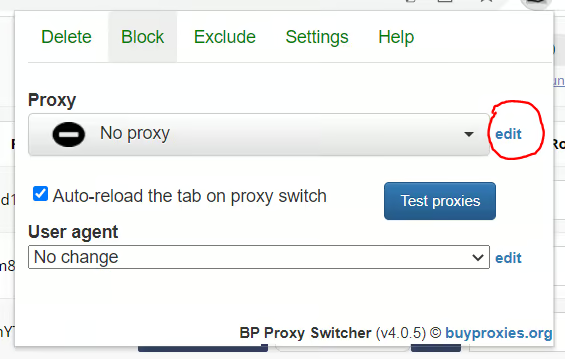
Open BP Proxy Switcher & Click "Edit"
Click the BP Proxy Switcher icon in your Chrome toolbar, then click the "Edit" button to open the text area where you insert your proxy list.
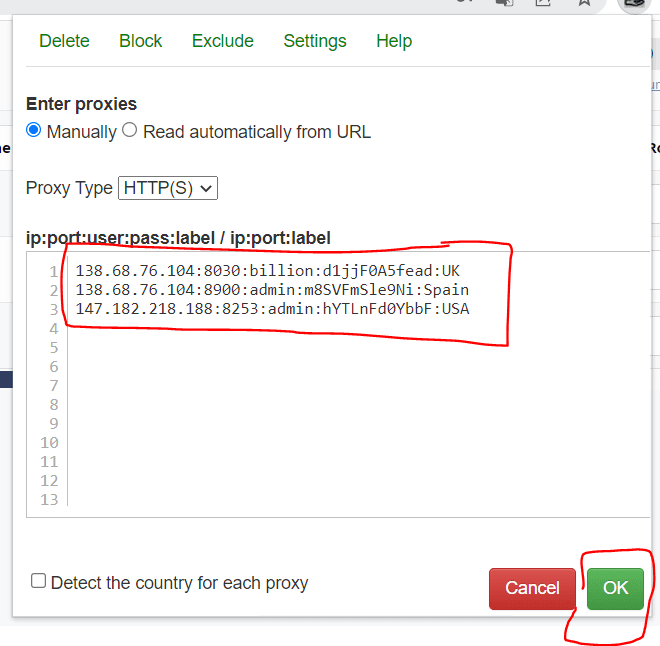
Paste Your Proxy List & Save
Paste all your Coronium proxies into the text field (one per line) and click "OK" to save. The extension will parse each line and display the proxies in your dropdown.
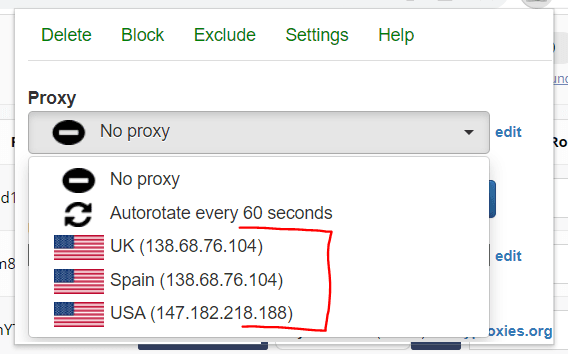
Switch Proxies from the Dropdown
Click the BP Proxy Switcher icon to see your proxy list with country flags. Click any proxy to switch instantly. Enable "Auto-rotate" to cycle through proxies every 60 seconds automatically.
Maintenance Status: No Longer Actively Updated
BP Proxy Switcher has not received updates since 2023 and does not support Chrome Manifest V3. While it still works in Chrome versions that support MV2 extensions, Google plans to fully enforce MV3 by late 2026, which will disable all MV2-only extensions. If you are setting up proxy management for the first time, we recommend starting with Proxy SwitchyOmega or FoxyProxy — both are actively maintained and MV3-compatible.
Proxy SwitchyOmega: The Best Chrome Proxy Extension
With over 4 million users, Proxy SwitchyOmega is the most popular and feature-rich proxy management extension for Chrome. It is open source (MIT license, hosted on GitHub), supports Manifest V3, and offers PAC script support, auto-switch rules by URL pattern, and unlimited proxy profiles. It is the direct successor to the now-deprecated Proxy SwitchySharp.
Open Source & Transparent
Full source code on GitHub under MIT license. Community audited, no hidden data collection. Over 8,000 GitHub stars.
PAC Script Support
Write JavaScript-based Proxy Auto-Configuration scripts for complex routing rules. Route different domains through different proxies automatically.
Auto-Switch Profiles
Create rules that automatically switch proxy profiles based on URL patterns. Example: *.facebook.com through US proxy, *.amazon.de through DE proxy.
Manifest V3 Compatible
Updated for Chrome MV3 with declarativeNetRequest support. Will continue working as Google phases out MV2 extensions in late 2026.
Step-by-Step: SwitchyOmega + Coronium Proxy Setup
Install Proxy SwitchyOmega
Go to the Chrome Web Store and search for "Proxy SwitchyOmega" or visit the extension page directly. Click "Add to Chrome" and confirm the installation. The omega icon will appear in your browser toolbar.
Create a New Proxy Profile
Click the SwitchyOmega icon in the toolbar, then select "Options." In the left sidebar, click "New profile." Name it something descriptive like "Coronium US" or "Coronium DE." Select "Proxy Profile" as the type and click "Create."
Enter Coronium Proxy Credentials
In the new profile settings, set the protocol to HTTP or SOCKS5 depending on your Coronium proxy configuration. Enter the proxy host (e.g., us.coronium.io), port number, and click the lock icon to enter your username and password from the Coronium dashboard.
Apply and Test
Click "Apply changes" in the top-left corner. Then click the SwitchyOmega toolbar icon and select your new "Coronium US" profile. Visit whatismyipaddress.com to confirm the proxy IP matches your Coronium proxy location.
Create Additional Profiles for Other Countries
Repeat steps 2-4 for each Coronium proxy you want to use. For example, create "Coronium DE" for Germany, "Coronium UK" for the United Kingdom. You can switch between them instantly from the toolbar dropdown.
SwitchyOmega Pro Tips for Coronium Users
Create an "Auto Switch" profile to route domains through country-specific Coronium proxies automatically
Use the "Quick Switch" keyboard shortcut (Alt+Shift+O by default) for instant profile toggling
Export your SwitchyOmega config as a backup before making changes — use Options > Import/Export
Set a "Direct" profile as your default so non-proxy traffic does not route through Coronium unnecessarily
Use the built-in "Condition types" (Host wildcard, URL regex) for fine-grained auto-switch rules
FoxyProxy: Chrome + Firefox Proxy Management
FoxyProxy is the go-to proxy extension for users who work across multiple browsers. With over 1 million installs across Chrome and Firefox, it provides URL pattern matching, proxy groups, and a clean interface. The free version covers basic proxy switching, while FoxyProxy Plus ($5.99/mo) adds automatic proxy testing, geo-IP detection, and import from subscription URLs.
URL Pattern Matching
Define wildcard or regex patterns to route specific domains through specific proxies. Works without writing PAC scripts.
Cross-Browser Support
Available natively on Chrome, Firefox, and Edge. Same interface and configuration across all three browsers.
Proxy Groups & Chaining
Organize proxies into groups and set failover chains. If proxy A fails, automatically fall back to proxy B.
Step-by-Step: FoxyProxy + Coronium Proxy Setup
Install FoxyProxy
Install FoxyProxy from the Chrome Web Store (or Firefox Add-ons if using Firefox). The fox icon will appear in your toolbar after installation.
Open FoxyProxy Options
Right-click the FoxyProxy icon and select "Options." This opens the proxy management panel where you can add, edit, and organize proxy configurations.
Add Coronium Proxy
Click "Add" to create a new proxy entry. Enter a title (e.g., "Coronium US Mobile"). Set the proxy type to HTTP or SOCKS5. Enter the Coronium proxy hostname, port, username, and password. Save the entry.
Configure URL Patterns (Optional)
FoxyProxy supports URL pattern matching — route specific domains through specific proxies. For example, route *.facebook.com through your US proxy and *.amazon.de through your Germany proxy. Add patterns under the "Patterns" tab for each proxy entry.
Activate and Verify
Click the FoxyProxy toolbar icon and select your Coronium proxy from the list. The icon color changes to indicate an active proxy. Verify by visiting an IP checker site.
FoxyProxy URL Pattern Example
Route Facebook and Instagram through your US Coronium proxy, while all other traffic goes direct:
Pattern Type: Wildcard
Pattern: *://*.facebook.com/*
Proxy: Coronium US (HTTP, us.coronium.io:8080)
Pattern: *://*.instagram.com/*
Proxy: Coronium US (HTTP, us.coronium.io:8080)
Chrome Proxy Extension Comparison (2026)
Side-by-side comparison of the 6 most popular browser proxy extensions. Features, user counts, Manifest V3 support, and our verdict for each.
| Extension | Users | Price | MV3 | PAC Scripts | URL Patterns | Auto-Switch | Verdict |
|---|---|---|---|---|---|---|---|
Proxy SwitchyOmega TOP PICK | 4M+ | Free (open source) | Best overall — most features, most users, actively maintained | ||||
FoxyProxy | 1M+ | Free (basic), $5.99/mo (Plus) | Best for Firefox — native cross-browser support | ||||
BP Proxy Switcher | 100K+ | Free | Simple and fast — no longer actively maintained | ||||
SmartProxy | 200K+ | Free | Good middle ground — pattern-based routing, no PAC needed | ||||
Proxy Helper | 50K+ | Free | Minimal — single proxy toggle, no advanced features | ||||
Proxy SwitchySharp | 300K+ (legacy) | Free | Deprecated predecessor to SwitchyOmega — do not use |
For Most Users
Proxy SwitchyOmega — free, open source, 4M+ users, MV3 ready, PAC scripts, auto-switch rules.
For Firefox Users
FoxyProxy — native Chrome + Firefox support, URL patterns, proxy groups, MV3 compatible.
For Simplicity
SmartProxy — URL-based routing without PAC scripts, clean interface, MV3 compatible.
Setting Up Coronium Mobile Proxies in Browser Extensions
Coronium 4G/5G mobile proxies work with all Chrome proxy extensions. Here is how browser proxy extensions interact with Coronium's infrastructure, and what makes mobile proxies the best choice for extension-based proxy management.
Extension Intercepts
Browser proxy extension hooks into Chrome's proxy API to intercept outgoing HTTP/HTTPS requests before they leave your machine.
Routes to Coronium
The request is forwarded to your Coronium proxy server (host:port) with your authentication credentials (user:pass).
Mobile Network Exit
Coronium routes the request through a real 4G/5G mobile carrier network. The destination site sees a genuine mobile IP via CGNAT.
Response Returns
The website response travels back through Coronium to your browser. The extension handles the connection transparently.
Coronium Proxy Credential Format
When configuring any browser extension with Coronium proxies, use the following details from your dashboard:
Protocol: HTTP or SOCKS5
Host: Your assigned proxy hostname (e.g., us-mobile.coronium.io)
Port: 8080 (HTTP) or 1080 (SOCKS5) — varies by proxy
Username: Your Coronium dashboard username
Password: Your Coronium dashboard password
For BP Proxy Switcher bulk import, use the format: host:port:username:password:label
Why Mobile Proxies Are Ideal for Browser Extensions
Carrier-Grade Trust
Mobile IPs are assigned by telecom operators (T-Mobile, Vodafone, etc.) and shared among thousands of real users via CGNAT. Platforms inherently trust these IPs.
95-99% Trust Scores
Mobile proxy IPs score 95-99% on platform trust checks (Pixelscan, Creepjs) versus 30-60% for datacenter IPs that are immediately flagged.
Real Device Backing
Each Coronium proxy runs through a physical SIM-equipped device on a real mobile network. Not a VPN, not a datacenter — actual mobile infrastructure.
On-Demand IP Rotation
Rotate your IP via the Coronium dashboard or API without changing extension settings. Same credentials, new IP — seamless for browser extension workflows.
PAC Script Configuration for Proxy Extensions
PAC (Proxy Auto-Configuration) scripts are JavaScript functions that tell your browser which proxy to use for each URL request. Supported by SwitchyOmega and FoxyProxy, PAC scripts enable sophisticated routing rules — sending specific domains through specific Coronium country proxies while keeping other traffic direct.
Route Specific Domains Through Proxy
Send traffic for specific domains through your Coronium proxy while all other traffic goes direct. Useful for accessing geo-restricted platforms without proxying your entire browsing session.
function FindProxyForURL(url, host) {
  // Route social media through Coronium proxy
  if (shExpMatch(host, "*.facebook.com") ||
      shExpMatch(host, "*.instagram.com") ||
      shExpMatch(host, "*.twitter.com")) {
    return "PROXY us.coronium.io:8080";
  }
  // Everything else goes direct
  return "DIRECT";
}
Country-Based Routing
Route traffic to different country-specific domains through corresponding Coronium proxies. Each regional site sees a local IP address.
function FindProxyForURL(url, host) {
  // German sites through DE proxy
  if (shExpMatch(host, "*.de") ||
      shExpMatch(host, "*.amazon.de")) {
    return "PROXY de.coronium.io:8080";
  }
  // UK sites through UK proxy
  if (shExpMatch(host, "*.co.uk") ||
      shExpMatch(host, "*.amazon.co.uk")) {
    return "PROXY uk.coronium.io:8080";
  }
  // Default: US proxy for everything else
  return "PROXY us.coronium.io:8080";
}
Proxy with SOCKS5 Fallback
Try HTTP proxy first, fall back to SOCKS5 if HTTP fails, then go direct as last resort. Ensures connectivity even if one protocol is blocked.
function FindProxyForURL(url, host) {
  // Skip proxy for local/internal addresses
  if (isPlainHostName(host) ||
      shExpMatch(host, "*.local") ||
      isInNet(host, "192.168.0.0", "255.255.0.0") ||
      isInNet(host, "10.0.0.0", "255.0.0.0")) {
    return "DIRECT";
  }
  // Try HTTP, then SOCKS5, then direct
  return "PROXY us.coronium.io:8080; " +
         "SOCKS5 us.coronium.io:1080; " +
         "DIRECT";
}
PAC Script Best Practices
Keep PAC scripts simple and synchronous — avoid async DNS resolution (dnsResolve) in frequently called functions, especially under MV3 where execution time limits are stricter
Use shExpMatch() for domain matching (wildcard patterns) and isInNet() for IP range matching (CIDR-like filtering for local networks)
Always include a DIRECT fallback as the last option in your return statement to prevent total browsing failure if all proxies are down
Test PAC scripts with the "Check proxy for URL" feature in SwitchyOmega Options before applying to your browsing session
Replace Coronium hostnames in the examples above with your actual proxy hostnames and ports from the Coronium dashboard
Chrome Manifest V3: What Changed for Proxy Extensions
Google's Chrome Manifest V3 (MV3), rolled out starting in 2024, fundamentally changed how browser extensions interact with network traffic. Several older proxy extensions — including BP Proxy Switcher and Proxy SwitchySharp — have not adapted. Here is what changed, what broke, and which extensions still work.
webRequest API Restricted
Impact: Extensions can no longer intercept and modify HTTP requests in real-time. The webRequest.onBeforeRequest listener that many proxy extensions used is now limited to observation-only for non-blocking use cases.
Workaround: Extensions must migrate to declarativeNetRequest API, which requires pre-declared rules instead of dynamic JavaScript processing.
declarativeNetRequest API Required
Impact: Proxy routing rules must be declared statically or via updateDynamicRules(). This is faster and more privacy-preserving but less flexible than webRequest-based proxy routing.
Workaround: SwitchyOmega and FoxyProxy have both released MV3-compatible versions that use declarativeNetRequest. BP Proxy Switcher has not been updated.
Service Workers Replace Background Pages
Impact: Persistent background pages that maintained proxy state are replaced by ephemeral service workers. Proxy extensions must handle state persistence differently — service workers can be terminated at any time.
Workaround: Use chrome.storage.session or chrome.storage.local to persist proxy configuration across service worker restarts.
PAC Script Support Limited
Impact: Complex PAC scripts that relied on asynchronous DNS resolution or external fetches may not work in MV3. The chrome.proxy API still supports PAC but with tighter execution limits.
Workaround: Keep PAC scripts simple and synchronous. Avoid myIpAddress() and dnsResolve() in frequently called PAC functions. Pre-resolve IPs where possible.
Extension Permissions Tightened
Impact: Proxy extensions must declare the "proxy" permission explicitly. Chrome shows a more prominent warning to users during installation, potentially reducing install rates.
Workaround: No workaround needed — users must accept the permission. The warning is informational only and does not affect functionality.
Extension MV3 Readiness Status (April 2026)
Released MV3 version in 2024. Full functionality preserved.
Updated for MV3. Chrome and Firefox versions both current.
Updated for MV3. URL pattern routing works with declarativeNetRequest.
No updates since 2023. Will stop working when Chrome enforces MV3.
Not updated. Minimal functionality, not recommended.
Fully deprecated. Replaced by SwitchyOmega years ago.
Per-Profile Proxy Setup for Multi-Account Management
Standard proxy extensions apply settings browser-wide — all tabs share the same proxy. For true per-account proxy isolation, you need separate browser profiles or a dedicated antidetect browser. Here are three approaches, from simplest to most robust.
Approach 1: Chrome Profiles + Extensions
Free, built-in, good for 2-5 accounts
Open Chrome Settings > click your profile icon in the top-right > "Add" to create a new Chrome profile.
In each Chrome profile, install SwitchyOmega (or your preferred proxy extension) separately — extensions are per-profile in Chrome.
Configure each profile's SwitchyOmega with a different Coronium proxy. Profile 1 uses Coronium US, Profile 2 uses Coronium DE, etc.
Each Chrome profile maintains its own cookies, localStorage, and session data — providing basic isolation between accounts.
Limitation: Chrome profiles do not spoof browser fingerprints (Canvas, WebGL, AudioContext). Platforms that use advanced fingerprinting can still link profiles on the same machine. For fingerprint isolation, use an antidetect browser.
Approach 2: Antidetect Browser + Coronium Proxies
Best for 5-100+ accounts with fingerprint isolation
Antidetect browsers (GoLogin, Multilogin, Incogniton, Dolphin Anty) provide per-profile proxy assignment with full browser fingerprint spoofing. Each profile gets its own dedicated Coronium proxy plus a unique Canvas, WebGL, AudioContext, timezone, and screen resolution fingerprint.
Approach 3: Firefox Container Tabs + FoxyProxy
Free Firefox-only option for cookie isolation
Firefox Multi-Account Containers create isolated cookie environments within the same browser window. Combined with FoxyProxy, you can assign different Coronium proxies to different containers. Tabs in "Personal" container use your US proxy, tabs in "Work" container use your DE proxy — all in one Firefox window.
Limitation: Container Tabs isolate cookies and storage but do not spoof browser fingerprints. The browser fingerprint is shared across all containers. Best for casual multi-account use, not for platforms with advanced fingerprint detection.
Which Approach Should You Use?
| Approach | Accounts | Cookie Isolation | Fingerprint Spoofing | Cost |
|---|---|---|---|---|
| Chrome Profiles + Extension | 2-5 | Free | ||
| Antidetect Browser + Coronium | 5-1000+ | $24-$149/mo | ||
| Firefox Containers + FoxyProxy | 2-8 | Free |
Frequently Asked Questions
Coronium Mobile Proxies for Chrome Extensions
Dedicated 4G/5G mobile proxies with carrier-grade IPs. Works with SwitchyOmega, FoxyProxy, BP Proxy Switcher, and all Chrome proxy extensions. HTTP & SOCKS5 support. 95-99% trust scores on all major platforms.
Configure & Buy Mobile Proxies
Select from 10+ countries with real mobile carrier IPs and flexible billing options
Choose Billing Period
Select the billing cycle that works best for you
SELECT LOCATION
when you order 5+ proxy ports
Carrier & Region
Available regions:
Included Features
🇺🇸USA Configuration
AT&T • Florida • Monthly Plan
Your price:
$129
/month
Unlimited Bandwidth
No commitment • Cancel anytime • Purchase guide
Perfect For
Popular Proxy Locations
Secure payment methods accepted: Credit Card, PayPal, Bitcoin, and more. 2 free modem replacements per 24h.
Choosing the Right Proxy Extension in 2026
SwitchyOmega for one-click proxy profile switching between Coronium countries. Free, 4M+ users, MV3 ready.
PAC scripts in SwitchyOmega or FoxyProxy for per-domain proxy routing. Route social media through US, shopping through EU.
Chrome Profiles or antidetect browsers for per-account proxy + fingerprint isolation. Essential for multi-account management.
BP Proxy Switcher served the Chrome proxy community well for years with its dead-simple interface, but its lack of Manifest V3 support means it is on borrowed time. Proxy SwitchyOmega is the clear successor — same ease of use with far more power (PAC scripts, auto-switch, open source, 4M+ users, and full MV3 compatibility).
For multi-browser workflows, FoxyProxy provides native Chrome and Firefox support with URL pattern matching. For multi-account management at scale, pair any of these extensions with Chrome Profiles (basic isolation) or an antidetect browser (full fingerprint isolation) along with dedicated Coronium mobile proxies for each account.
Regardless of which extension you choose, Coronium 4G/5G mobile proxies deliver carrier-grade IP addresses that platforms trust. Set up your proxy credentials in SwitchyOmega or FoxyProxy, switch between country profiles with one click, and browse with 95-99% trust scores backed by real mobile carrier infrastructure.
Disclaimer
Our 4G mobile proxies are intended for legal and legitimate use only. This page is solely for informational and marketing purposes. Extension names, user counts, and features referenced in this guide are based on publicly available information as of April 2026 and may change. It is the user's responsibility to ensure compliance with the terms of service of the platforms they are using our proxies on. We do not condone or support the use of our proxies for illegal or unauthorized activities. By using our proxies, you agree to use them in accordance with all applicable laws and regulations. We will not be held liable for any misuse of our proxies. Please read our Terms of Service before using our services.