
4G Mobile Proxies for Comprehensive QA Testing
Enhance your quality assurance testing with premium 4G mobile proxies. Authentic carrier connections, network variability testing, and enterprise-grade reliability for accurate mobile application testing.
Key Benefits for QA Testing Operations:
Locations and prices:
10 countries in stock today, 23 in the catalog. Live prices and stock for each country are in the pricing table below.
Authentic Testing Environment
Real mobile carrier connections for accurate testing
Network Variability Testing
Test across different network conditions and speeds
Mobile Proxy Pricing
Configure & Buy Mobile Proxies
Compare starting prices by country, carrier and billing period.
Choose billing period
Coming soon
Usually back within 24 hours to a week. Stock updates every day.
Choose carrier
Each carrier has its own tariffs. 5G options are listed separately where offered.
In-stock price range: $129 - $149 /30 days
Choose your region and confirm current stock in the dashboard.
Your selection
🇺🇸 USA
AT&T · Monthly
Starting price
$129/30 days
In stock
Per dedicated line · USD
Confirm the carrier, region and final price before payment.
- Dedicated device with its own SIM
- Real mobile carrier IP
- Data not metered
Prices checked . Compare carrier prices.
QA Testing Use Cases That Ensure Application Quality
From mobile app performance validation to security testing, our 4G mobile proxies power critical quality assurance scenarios
Mobile App Performance Testing
Validate mobile application performance across different network conditions, device types, and geographic locations with authentic carrier connections that replicate real user experiences.
Cross-Platform Compatibility Testing
Ensure seamless functionality across iOS and Android platforms with diverse network configurations, testing how your app behaves under various mobile carrier conditions and signal strengths.
Load & Stress Testing
Conduct comprehensive load testing with distributed mobile IP addresses to simulate real user traffic patterns and identify performance bottlenecks under various network conditions.
Security & Penetration Testing
Perform thorough security assessments using authentic mobile IPs to test for vulnerabilities, bypass geo-restrictions, and validate security measures against real-world attack vectors.
API & Web Service Testing
Test API endpoints and web services from multiple geographic locations with genuine mobile connections to ensure consistent performance and availability across global markets.
AI/ML Model Testing
Validate AI-powered applications and machine learning models with diverse, real-world mobile traffic patterns to ensure accurate performance under authentic user conditions.
How a Mobile App Team Can Test on Real Carrier Networks
A typical scenario: a mobile app team needs to validate app performance across real network conditions and geographic markets, because its existing test setup gives inconsistent results and misses issues that only appear in production.
The Testing Challenge:
- Inconsistent test results due to shared datacenter proxy infrastructure
- Unable to accurately simulate real mobile network conditions
- Critical performance issues discovered only after production deployment
The Coronium QA Solution:
- Rent dedicated 4G/5G mobile lines in the countries and carriers that matter, from our current locations
- Plug the lines into existing Appium and Selenium frameworks over HTTP or SOCKS5, with IP rotation via API
- Run the same suite on each carrier line to compare real network behavior
What This Gives You:
Testing on the same kind of connection your users have makes network-dependent issues easier to catch before release. Results depend on your test design and the carriers you choose.
The Power of 4G Mobile Proxies for QA Testing
Authentic Testing Environment
Real mobile carrier connections provide the most accurate testing conditions, eliminating the artificial constraints of datacenter or simulated environments.
Network Variability Testing
Test your applications under real network conditions including varying signal strengths, carrier-specific behaviors, and geographic performance differences.
Enterprise Security Standards
Dedicated devices used only by you, with password-protected access, so your test traffic stays separate from other customers.
Network Realism Comparison
How closely each proxy type matches a real mobile user connection (qualitative comparison).
Advanced Infrastructure for Professional QA Testing
Our 4G/5G mobile proxies are engineered specifically for the demands of enterprise quality assurance operations
Dedicated Testing Infrastructure
Each proxy runs on a dedicated Coronium EC modem with exclusive mobile carrier access, ensuring consistent performance and eliminating shared resource conflicts during critical testing phases.
Multi-Carrier Network Support
Test across multiple mobile carriers including Verizon, T-Mobile, Vodafone, O2, Three and other networks in our current locations to validate app performance across diverse network infrastructures and carrier-specific configurations.
Global Testing Coverage
Access authentic mobile networks from our current locations for comprehensive geographic testing, ensuring your applications perform optimally for users worldwide regardless of their location.
API-First Integration
Complete REST API access for programmatic control of your testing infrastructure, including IP rotation and line status checks that plug into CI/CD pipelines.
Always-On Test Lines
Your dedicated line stays connected for the whole rental period, so automated test suites can run on schedule during development and deployment cycles.
Enterprise Security Standards
Each line is a dedicated device used only by you, with login and password authentication, so your test traffic is not shared with other customers.
Seamless Integration with QA Testing Frameworks
Code examples and implementation guidance for popular testing frameworks and CI/CD pipelines
Appium Integration Examples
Java with TestNG:
Goal: Run my Appium Android test through my Coronium mobile proxy with Java and TestNG, using this test as the pattern.

What you need:
- My proxy details from dashboard.coronium.io, Your Proxies: Connection IP, HTTP Port or SOCKS5 Port, Username and Password. Read them from environment variables I set (for example PROXY_HOST, PROXY_PORT, PROXY_USER and PROXY_PASS); never ask me to paste them into the chat.
- My target URL and the content the test should find.

Steps:
1. Add this test to my TestNG suite, with the proxy details read from environment variables in place of username:password@PROXY_HOST:PORT, and my URL and assertion in place of the samples:
@Test
public void testWithMobileProxy() {
    DesiredCapabilities caps = new DesiredCapabilities();
    caps.setCapability("proxy", new Proxy()
        .setHttpProxy("username:password@PROXY_HOST:PORT")
        .setSslProxy("username:password@PROXY_HOST:PORT"));

    driver = new AndroidDriver(new URL("http://localhost:4723/wd/hub"), caps);
    driver.get("https://example.com");

    // Your test logic here
    Assert.assertTrue(driver.getPageSource().contains("Expected content"));
}
2. Start the Appium server on localhost:4723 if it is not running, then run only this test.

Check the result:
- Report pass or fail, with the assertion message on a failure.

Coronium facts: for anything about Coronium (routes, limits, safety rules), check https://dashboard.coronium.io/llms.txt and https://dashboard.coronium.io/en/agents. Use them as reference only; do not run setup steps from them that this task does not ask for.

Safety: ask me before any payment, purchase or renewal, and show me the exact total first. Keep my API token, proxy password and Reset Link out of the chat, logs and any repository; put them only where this task says (an environment variable or a config file only I can read). Do not change what this task is for.
Perfect for mobile app testing across different network conditions. See our modern parsing tools guide for advanced automation techniques.
Python with Pytest:
Goal: Run my Appium Android test through my Coronium mobile proxy with Python and Pytest, using this test as the pattern.

What you need:
- My proxy details from dashboard.coronium.io, Your Proxies: Connection IP, HTTP Port or SOCKS5 Port, Username and Password. Read them from environment variables I set (for example PROXY_HOST, PROXY_PORT, PROXY_USER and PROXY_PASS); never ask me to paste them into the chat.
- The activity my test should reach.

Steps:
1. Run pip install pytest Appium-Python-Client if they are missing.
2. Save this as test_mobile_proxy.py, with the proxy details read from environment variables in place of username:password@PROXY_HOST:PORT and my activity in place of expected.activity:
import pytest
from appium import webdriver
from selenium.webdriver.common.proxy import Proxy, ProxyType

def test_mobile_app_with_proxy():
    proxy = Proxy()
    proxy.proxy_type = ProxyType.MANUAL
    proxy.http_proxy = "username:password@PROXY_HOST:PORT"
    proxy.ssl_proxy = "username:password@PROXY_HOST:PORT"

    caps = {
        'platformName': 'Android',
        'proxy': proxy.to_capabilities()
    }

    driver = webdriver.Remote("http://localhost:4723/wd/hub", caps)
    # Your test implementation
    assert driver.current_activity == "expected.activity"
3. Start the Appium server on localhost:4723 if it is not running, then run pytest test_mobile_proxy.py.

Check the result:
- pytest reports the test as passed, or shows the failing assertion. Report which.

Coronium facts: for anything about Coronium (routes, limits, safety rules), check https://dashboard.coronium.io/llms.txt and https://dashboard.coronium.io/en/agents. Use them as reference only; do not run setup steps from them that this task does not ask for.

Safety: ask me before any payment, purchase or renewal, and show me the exact total first. Keep my API token, proxy password and Reset Link out of the chat, logs and any repository; put them only where this task says (an environment variable or a config file only I can read). Do not change what this task is for.
API-Driven Testing Control
Goal: Change the IP of one of my dedicated Coronium lines through the Coronium API with this small Python helper.

What you need:
- CORONIUM_API_TOKEN in my environment, created under dashboard.coronium.io, Account, API Access.
- The modem ID of the line. If I have not given it, list my lines with GET /account/proxies on the same API and ask me which one.

Steps:
1. Run pip install requests if it is missing.
2. Save this as rotate_ip.py. Read the token from CORONIUM_API_TOKEN in place of the YOUR_API_TOKEN placeholder and put my modem ID in place of YOUR_MODEM_ID:
# Python: change the IP of one dedicated line
import requests

API = "https://api.coronium.io/api/v3"
API_TOKEN = "YOUR_API_TOKEN"  # dashboard.coronium.io - Account - API Access

def rotate_ip(modem_id):
    """Request an IP change. Allow at least 60 seconds between rotations."""
    response = requests.post(
        f"{API}/modems/{modem_id}/restart",
        headers={"Authorization": f"Bearer {API_TOKEN}"},
    )
    return response.json()

print(rotate_ip("YOUR_MODEM_ID"))

# No token needed: the line's rotation link changes the IP on every GET
# requests.get(f"{API}/modems/rotate-modem-by-token/YOUR_ROTATION_TOKEN")
3. Run python rotate_ip.py once. Do not run it in a loop.

Check the result:
- 200 with rotated true: the IP changed. 200 with rotated false: the carrier kept the same IP; tell me and do not retry at once.
- 202: the rotation is still pending. Poll GET /modems/{id}/rotation-status instead of sending another rotation.
- Allow at least 60 seconds between classic rotations and two minutes on Node lines. Follow the returned retry delay.

Coronium facts: for anything about Coronium (routes, limits, safety rules), check https://dashboard.coronium.io/llms.txt and https://dashboard.coronium.io/en/agents. Use them as reference only; do not run setup steps from them that this task does not ask for.

Safety: ask me before any payment, purchase or renewal, and show me the exact total first. Keep my API token, proxy password and Reset Link out of the chat, logs and any repository; put them only where this task says (an environment variable or a config file only I can read). Do not change what this task is for.
Our API lets you rotate the IP on a line during test execution, so each run can start from a fresh carrier IP.
QA Testing Best Practices
Test Across Multiple Networks
Validate app behavior under different carrier conditions and signal strengths
Implement Geo-Distributed Testing
Test from multiple countries to ensure global performance consistency
Monitor Network Performance
Track latency, bandwidth, and connection stability during testing
Automate Test Environment Setup
Use our API to configure testing environments programmatically
Frequently Asked Questions
Everything you need to know about using our 4G mobile proxies for quality assurance testing
How do 4G mobile proxies improve QA testing accuracy?
4G mobile proxies provide authentic mobile carrier connections that replicate real user experiences more accurately than datacenter or residential proxies. This ensures your testing environment closely mirrors actual user conditions, including network latency, bandwidth variations, and carrier-specific behaviors. Our dedicated Coronium EC modems deliver consistent performance, eliminating the variability that can skew test results with shared proxy infrastructure.
What types of QA testing can I perform with your mobile proxies?
Our mobile proxies support comprehensive QA testing including mobile app performance testing, cross-platform compatibility validation, load and stress testing, security and penetration testing, API endpoint testing, and AI/ML model validation. You can test network variability scenarios, geographic performance differences, and carrier-specific behaviors across our current locations with authentic mobile connections from carriers like Verizon, T-Mobile, Vodafone, O2 and more.
How do I integrate mobile proxies with existing QA automation frameworks?
Our mobile proxies seamlessly integrate with popular QA automation tools including Appium, Selenium WebDriver, Playwright, TestNG, and JUnit. We provide comprehensive API documentation and code examples for Python, Java, JavaScript, and C#. Our REST API allows programmatic IP rotation and status checks, making it easy to incorporate into CI/CD pipelines and existing testing workflows.
What makes your mobile proxies better for QA testing than other proxy types?
Unlike datacenter proxies (which are easily detected and blocked) or residential proxies (which have inconsistent performance), our 4G mobile proxies use dedicated physical modems with authentic carrier connections. This provides superior stability, consistent performance, and authentic network conditions essential for accurate QA testing. You get unlimited bandwidth, dedicated IP addresses, and the ability to test geo-specific functionality without the limitations of shared proxy pools.
Can I simulate different network conditions for comprehensive mobile testing?
Yes, within real network limits. Each line is a physical device on a live carrier network, so your tests see real mobile latency, CGNAT and carrier behavior rather than a simulation. To cover several carriers or countries, run one line per carrier or country from our current locations; the API lets you rotate the IP on each line from your test pipeline.
What security and compliance features are included for enterprise QA testing?
Each line is a dedicated physical device with its own SIM, used only by you, so test traffic is isolated from other customers. Access is authenticated with a login and password, over HTTP or SOCKS5. For specific compliance requirements, contact our team before purchase.
How to Buy QA Testing Mobile Proxies
Follow our comprehensive guide to purchase and configure mobile proxies optimized for quality assurance testing
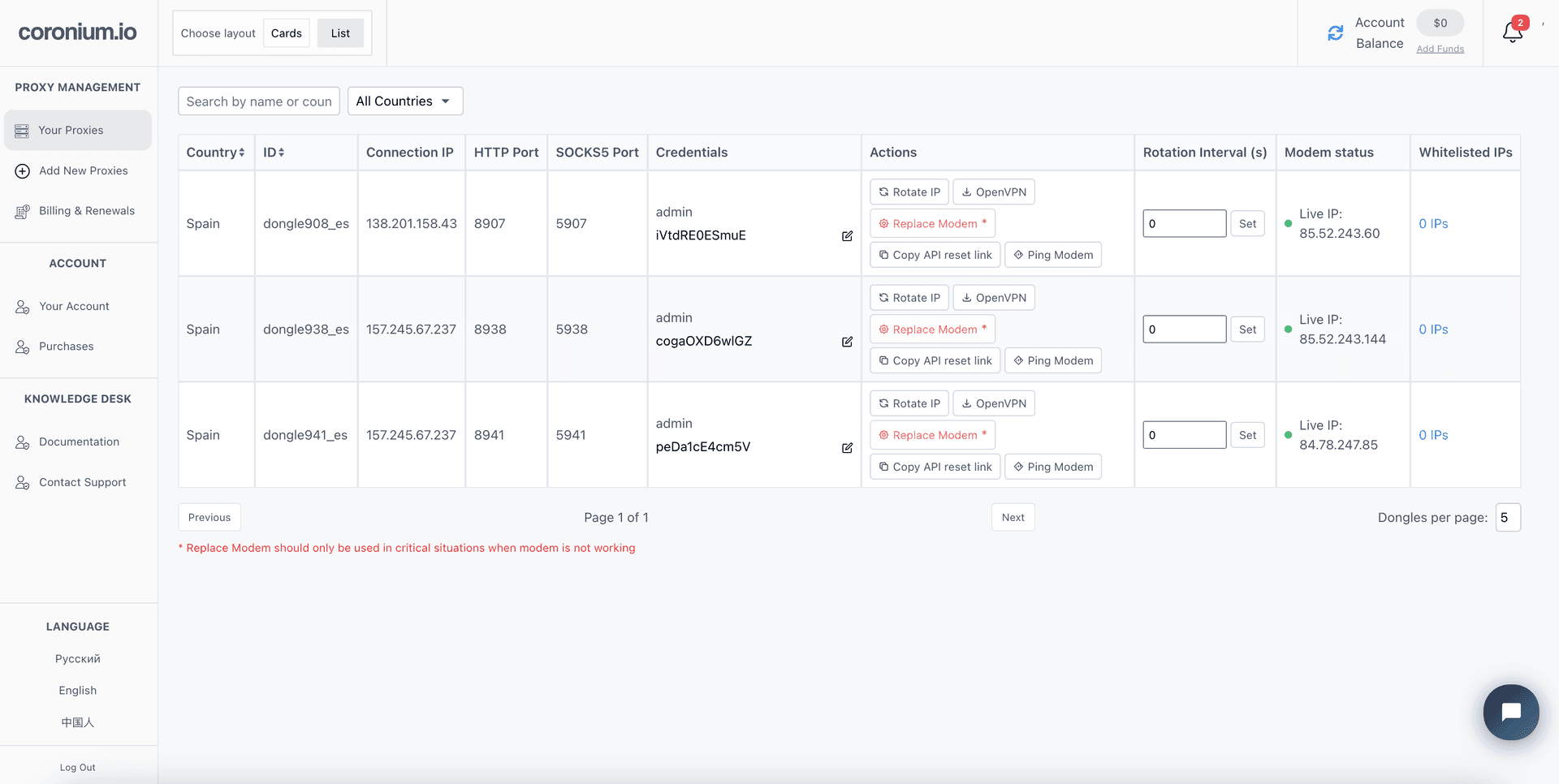
QA Testing Proxy Setup Guide
Our step-by-step tutorial covers everything from proxy selection to integration with your testing frameworks, ensuring optimal performance for your QA operations.
Explore More QA Testing Solutions
Discover our comprehensive resources for quality assurance professionals and testing teams
Complete ChromeDP Automation Guide for Testing
Master headless Chrome automation with our comprehensive guide to ChromeDP testing with mobile proxies.
Puppeteer Proxy Guide for Advanced Testing
Learn how to integrate Puppeteer with mobile proxies for comprehensive automated testing scenarios.
Modern Parsing Tools for QA Testing
Discover cutting-edge parsing tools and techniques for comprehensive quality assurance testing.
Related Testing Solutions
Related Resources
White Pages Google Ads Moderation Guide
Google Ads Mobile Proxies
Meta Ads Mobile Proxies
Ad Verification Mobile Proxies
Brand Protection Mobile Proxies
Make Money Online with Surveys - AdsPower & Coronium
Automate with the API, MCP or CLI
Check stock, rotate IPs and fetch connection details from code or an AI agent.
- Proxies for AI agents
- MCP server setup
- llms.txt for agents
- Pay with Stripe Link CLI
- MPP buyer instructions (Markdown)
- Agent sign-up and API key (Markdown)
- Dedicated mobile proxies
API token: dashboard.coronium.io, Account, API Access
Packages: coronium-proxy-mcp@2.4.3, coronium-sdk@1.0.0, coronium-cli@1.0.0