Does TikTok Allow You to Schedule Posts on Desktop?
Yes, TikTok offers a native desktop scheduler. And recently, they've quietly extended the window. But for multi-account managers, "possible" doesn't mean "scalable."
Let's break down the real limits.
The 30-Day Scheduling Cap
Most people think the 30-day limit is just an inconvenience. But for professionals running 50+ accounts, it is a strategic roadblock.
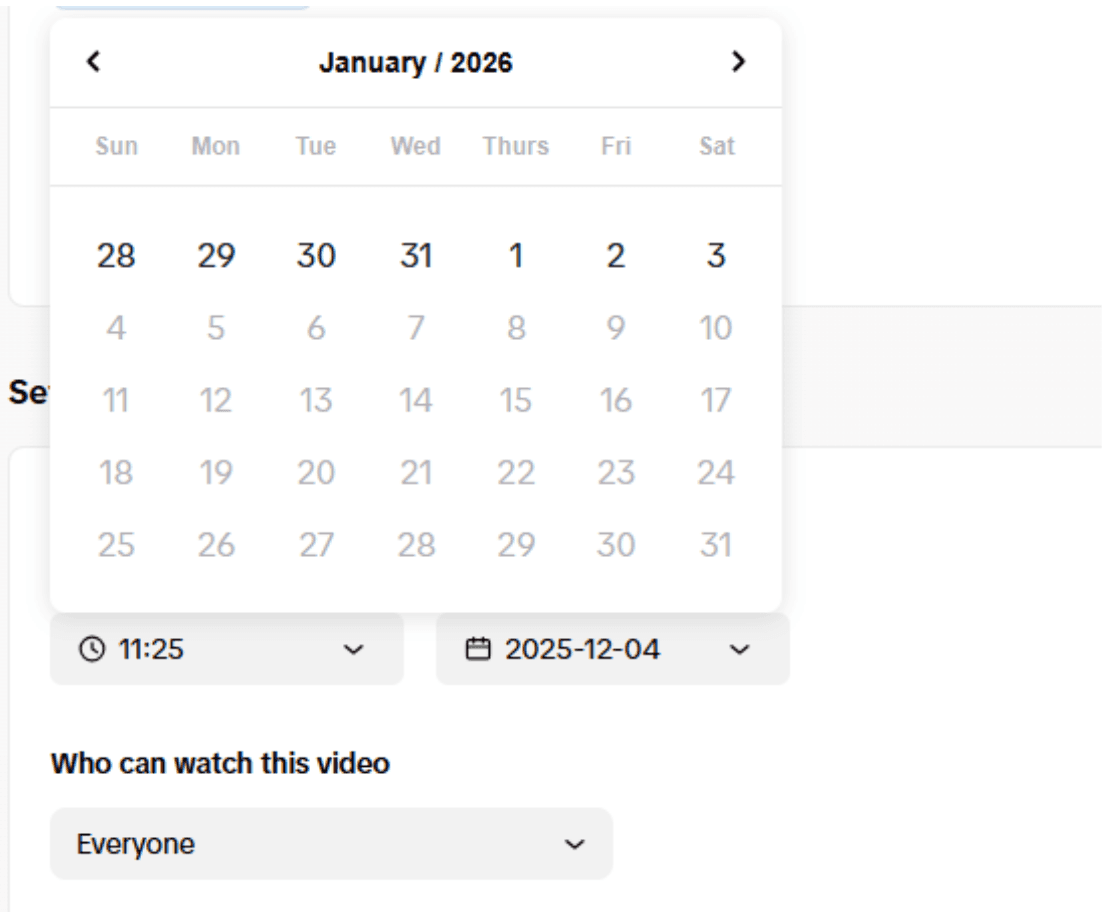
Why is this a problem?
Because real accounts don't all behave on the same monthly cycle. To simulate authentic growth, you need timeline diversity:
- Group A might need a heavy content blitz in January
- Group B might need to stay dormant for weeks and then "wake up" in mid-February
- Group C might be prepping for a seasonal campaign in March
With a hard 30-day wall, your accounts all look like they are running on the exact same factory shift. That uniformity is exactly what algorithms look for to identify bot farms.
Desktop vs. Mobile Features: What You Lose
According to Statista, over 96% of the global digital population are mobile users. TikTok is, fundamentally, a mobile ecosystem.
When you manage your accounts exclusively via a desktop browser, you are placing yourself in the tiny 4% minority. To TikTok's algorithm, a "Browser-Only" account looks suspicious.
The "Browser Fingerprint" Trap
You create 10 different Chrome Profiles. You may even install a proxy extension for each one to give them different IPs. You feel like a spy. But to TikTok, you are naked.
The reality of browser profiles
Chrome Profiles only separate your cookies, not your device fingerprint. Even if you change your IP address for every account, your computer is still leaking dozens of unique hardware signals:
- Screen resolution
- Graphics card renderer
- Browser language
- Local time zone
- Installed font list
Seeing 20 accounts with different IPs but the exact same hardware fingerprint is the biggest red flag. It screams "bot farm."
Why Traditional Schedulers Are Not Built For "Account Farmers"
If you are a brand managing three or four established accounts, Buffer or Hootsuite work perfectly. However, for professionals managing dozens or hundreds of accounts, these tools have serious limitations.
Missing account warm-up
Buffer and Hootsuite only publish content, but can't mimic real user activity: scrolling, liking, commenting.
No IP and location control
Cannot assign unique residential proxy to each of your 50 accounts to simulate different locations.
Unable to create new environments
Cannot generate clean device fingerprints for safely registering new TikTok accounts.
Building a Safe Foundation with Cloud Phones
If you need a tool to build TikTok accounts from zero to one, you should try GeeLark.
GeeLark — Industry-Leading Cloud Phone Platform
Designed for secure multi-account management. Whether you are registering new TikTok accounts or scheduling posts, GeeLark handles it safely.
Here is why it works
Authentic Android environments
Each cloud phone is a real Android device with unique digital fingerprint.
Flexible proxy configuration
Assign unique residential proxy to each profile for working with different regions.
Secure team collaboration
Organize accounts into groups and assign permissions without data leaks.
Cloud-based automation
Workflows continue in the cloud even after closing the software or shutting down your computer.
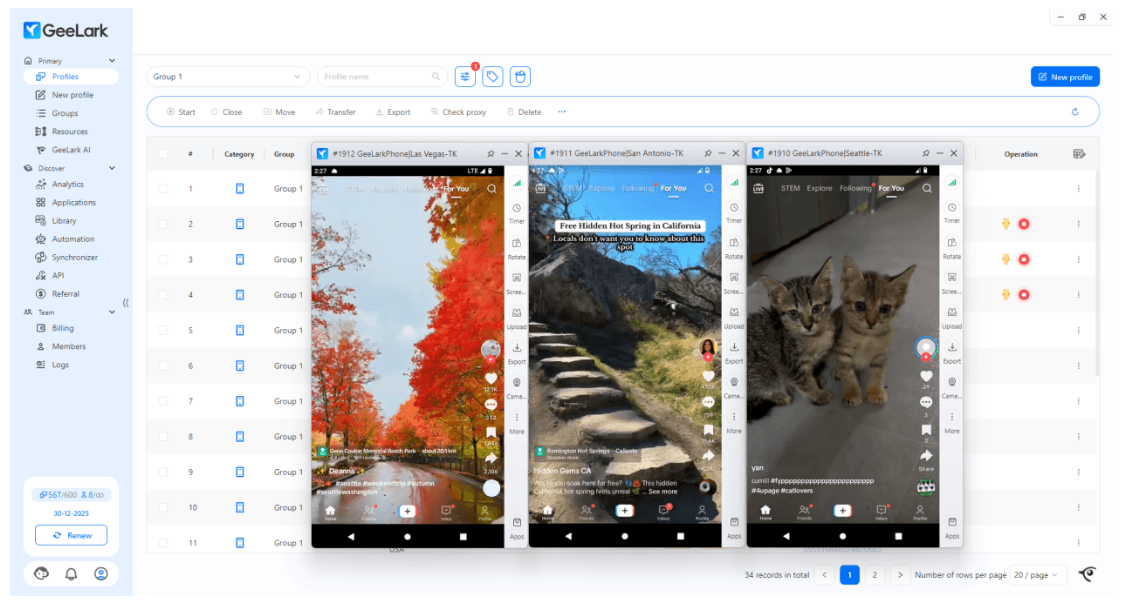
How to Schedule TikTok Posts Using Cloud Mobile Phones
Create a Cloud Phone Profile
Start by opening New Profile to create your cloud phone. In the Proxy Setting section, it's best to add a proxy. The proxy IP becomes the phone's IP and network environment. We strongly recommend using a residential proxy, since it makes your TikTok account look more like a real user.
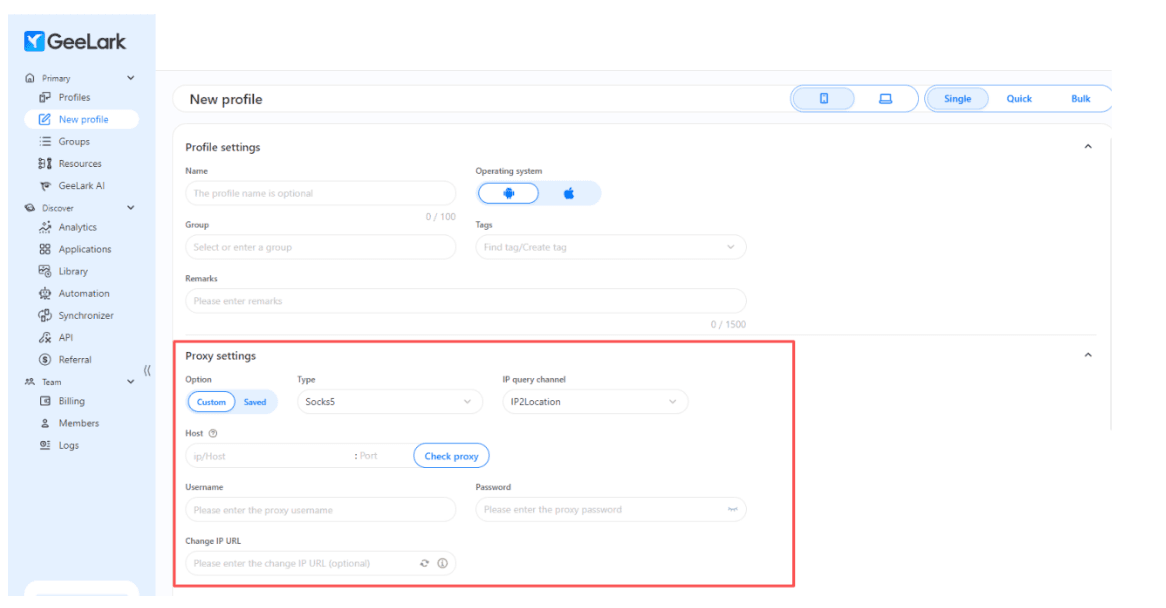
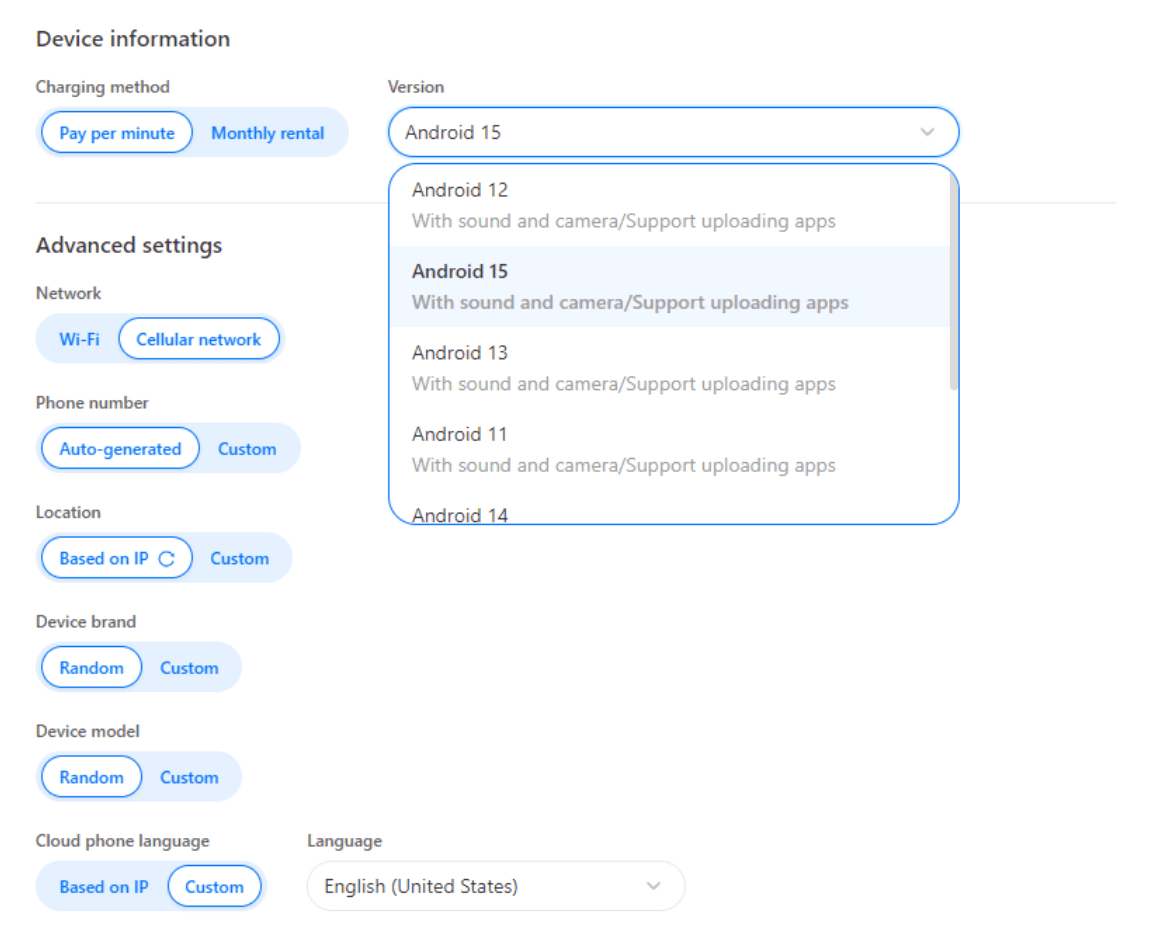
Next, in the device info area, you can pick the Android version you want, from Android 9 up to 15. The system will automatically generate details like the phone brand and model. If you don't have specific requirements, the default settings work perfectly fine. Once everything looks good, click Create. That's it — you now have a brand-new virtual phone with a fresh fingerprint and a clean network environment.
Install TikTok in Bulk and Log In
In GeeLark, you don't have to install TikTok on each phone one by one. Just install TikTok once from the App Store and enable it under Team's Applications. After that, every time you open a cloud phone, TikTok installs automatically.
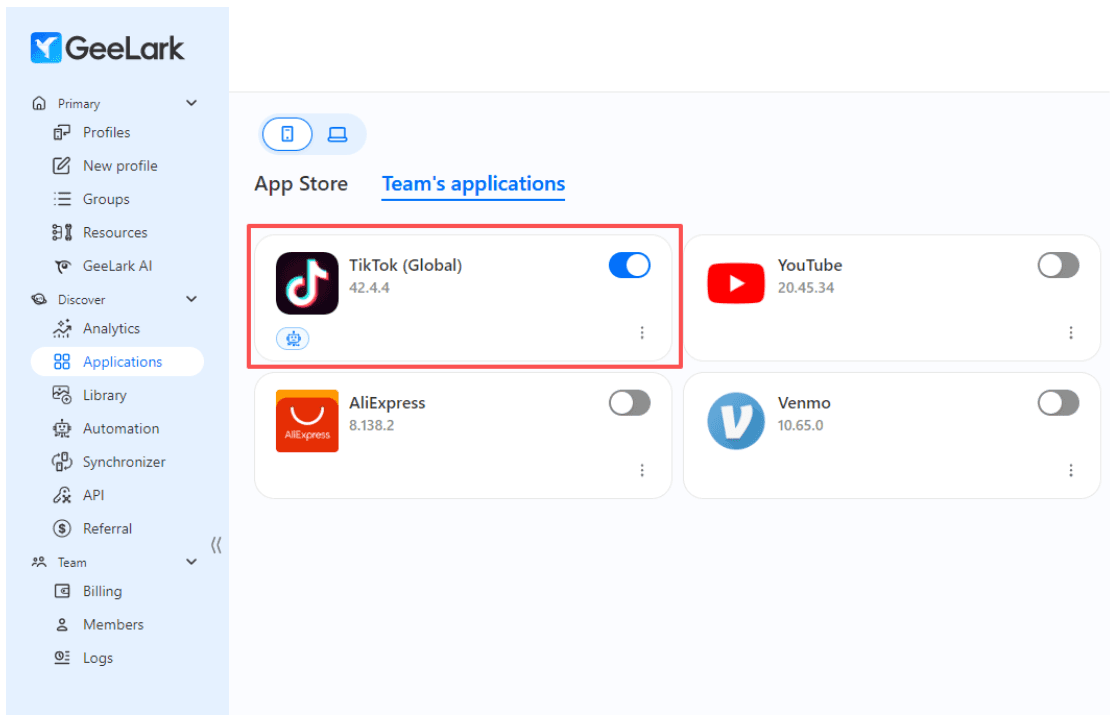
In just a few seconds, you can have TikTok ready on dozens of devices. That's already far more efficient than using physical phones.
Choose an Automation Template and Run It
This is where the platform really beats traditional scheduling tools. If you're not ready to schedule posts yet, you can use the AI warm-up features. Just pick an automation template, and the system will mimic real human actions — scrolling, tapping, watching videos, commenting, liking, and adding posts to favorites. This keeps your TikTok accounts active instead of looking like cold, inactive bots.
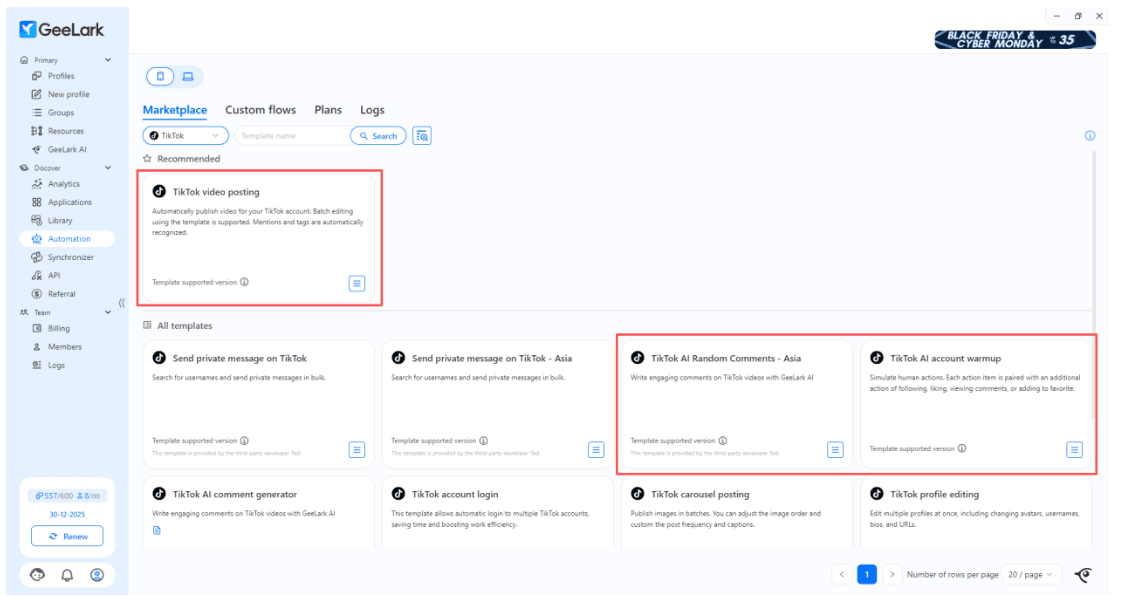
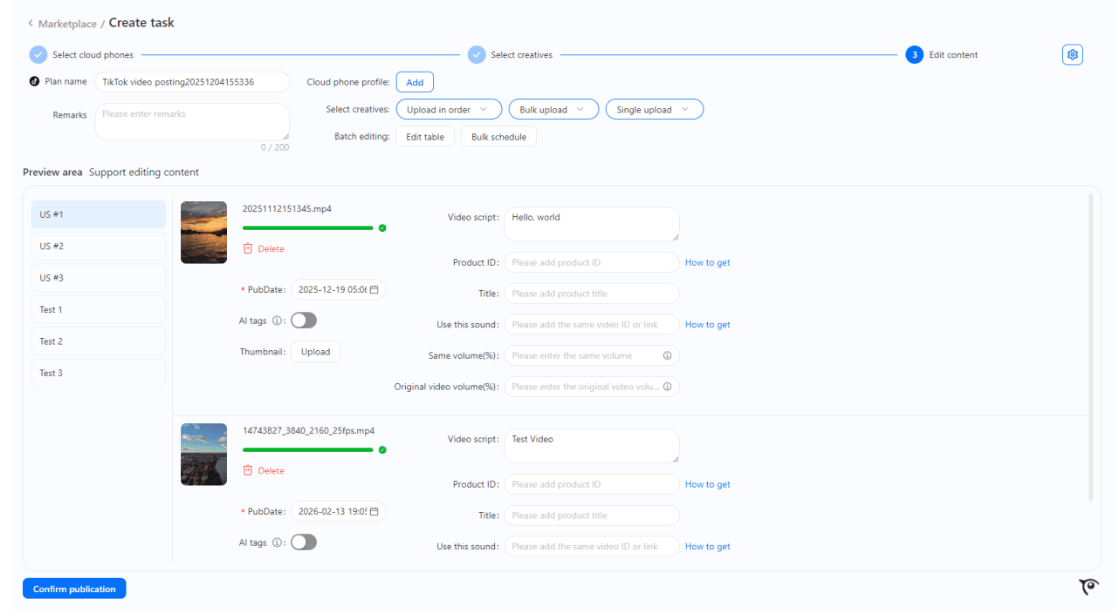
If you do need to schedule posts for hundreds of TikTok accounts, this part is incredibly simple. Select TikTok Video Posting, choose the accounts you want to publish to, upload your video files, add your captions, and set the posting time. There's no 30-day limit here — you can even schedule tasks six months ahead if you want.
Key Advantage
Once everything is set, you can close the software and move on with your day. The automation will run at the exact time you scheduled, even if your computer is turned off or you're asleep. There's no 30-day limit — you can schedule tasks six months ahead.